
Detect issues from multimodal input
Send traces that include images or PDF files in user messages and get issue detection on the model's responses.
This guide shows you how to send traces that contain images or PDF files to Blue Guardrails. Issue detection works on conversations with multimodal input the same way it works on text-only conversations. You instrument your code, send traces, and detection runs automatically.
Prerequisites
- A Blue Guardrails account with a workspace and credits
- A workspace role of Contributor or higher (see Roles and permissions)
- A workspace API key with the Write traces permission (see Create an API key for your workspace)
- An application that sends images or PDF files to an LLM (see Getting started for basic setup)
Send traces with image input
Your instrumentation setup stays the same as described in Getting started. The only change is in the messages you send to the model: include one or more images alongside text.
Each framework has its own format for image content. The examples below load an image from disk and send it as part of a user message.
import os
import base64
from pathlib import Path
os.environ['OTEL_EXPORTER_OTLP_TRACES_ENDPOINT'] = 'https://api.blueguardrails.com/v1/traces'
os.environ['OTEL_EXPORTER_OTLP_HEADERS'] = (
f'Authorization=Bearer {YOUR_API_KEY}'
)
import openai
import logfire
client = openai.Client()
logfire.configure(send_to_logfire=False)
logfire.instrument_openai()
image_b64 = base64.b64encode(Path('chart.png').read_bytes()).decode()
response = client.chat.completions.create(
model='gpt-5.4-mini',
messages=[
{'role': 'system', 'content': 'Answer the question based on the provided chart.'},
{
'role': 'user',
'content': [
{'type': 'text', 'text': 'What does this chart show?'},
{
'type': 'image_url',
'image_url': {'url': f'data:image/png;base64,{image_b64}'},
},
],
},
],
)
print(response.choices[0].message.content)import os
import base64
from pathlib import Path
os.environ['OTEL_EXPORTER_OTLP_TRACES_ENDPOINT'] = 'https://api.blueguardrails.com/v1/traces'
os.environ['OTEL_EXPORTER_OTLP_HEADERS'] = (
f'Authorization=Bearer {YOUR_API_KEY}'
)
import anthropic
import logfire
client = anthropic.Anthropic()
logfire.configure(send_to_logfire=False)
logfire.instrument_anthropic()
image_b64 = base64.b64encode(Path('chart.png').read_bytes()).decode()
response = client.messages.create(
max_tokens=1000,
model='claude-haiku-4-5',
system='Answer the question based on the provided chart.',
messages=[
{
'role': 'user',
'content': [
{'type': 'text', 'text': 'What does this chart show?'},
{
'type': 'image',
'source': {
'type': 'base64',
'media_type': 'image/png',
'data': image_b64,
},
},
],
},
],
)
print(response.content[0].text)import os
from pathlib import Path
os.environ['OTEL_EXPORTER_OTLP_TRACES_ENDPOINT'] = 'https://api.blueguardrails.com/v1/traces'
os.environ['OTEL_EXPORTER_OTLP_HEADERS'] = (
f'Authorization=Bearer {YOUR_API_KEY}'
)
os.environ['OTEL_INSTRUMENTATION_GENAI_CAPTURE_MESSAGE_CONTENT'] = 'true'
from google.genai import Client, types
import logfire
client = Client()
logfire.configure(send_to_logfire=False)
logfire.instrument_google_genai()
image_data = Path('chart.png').read_bytes()
response = client.models.generate_content(
model='gemini-3-flash-preview',
config=types.GenerateContentConfig(
system_instruction='Answer the question based on the provided chart.',
),
contents=[
types.Part.from_bytes(data=image_data, mime_type='image/png'),
'What does this chart show?',
],
)
print(response.text)import os
from pathlib import Path
os.environ['OTEL_EXPORTER_OTLP_TRACES_ENDPOINT'] = 'https://api.blueguardrails.com/v1/traces'
os.environ['OTEL_EXPORTER_OTLP_HEADERS'] = (
f'Authorization=Bearer {YOUR_API_KEY}'
)
import logfire
from pydantic_ai import Agent
from pydantic_ai.messages import BinaryContent
logfire.configure(send_to_logfire=False)
logfire.instrument_pydantic_ai()
image_data = Path('chart.png').read_bytes()
agent = Agent(
'openai:gpt-5.4-mini',
output_type=str,
system_prompt='Answer the question based on the provided chart.',
)
result = agent.run_sync([
'What does this chart show?',
BinaryContent(data=image_data, media_type='image/png'),
])
print(result.output)import os
import base64
from pathlib import Path
os.environ['OTEL_EXPORTER_OTLP_TRACES_ENDPOINT'] = 'https://api.blueguardrails.com/v1/traces'
os.environ['OTEL_EXPORTER_OTLP_HEADERS'] = (
f'Authorization=Bearer {YOUR_API_KEY}'
)
os.environ['OTEL_INSTRUMENTATION_GENAI_CAPTURE_MESSAGE_CONTENT'] = 'true'
import logfire
from haystack.components.generators.chat import OpenAIChatGenerator
from haystack.dataclasses import ChatMessage
from haystack.dataclasses.image_content import ImageContent
logfire.configure(send_to_logfire=False)
logfire.instrument_openai()
image_b64 = base64.b64encode(Path('chart.png').read_bytes()).decode()
generator = OpenAIChatGenerator(model='gpt-5.4-mini')
response = generator.run([
ChatMessage.from_system('Answer the question based on the provided chart.'),
ChatMessage.from_user(
content_parts=[
'What does this chart show?',
ImageContent(base64_image=image_b64, mime_type='image/png'),
]
),
])
print(response)import os
import base64
from pathlib import Path
# Set these before importing langchain
os.environ['LANGSMITH_OTEL_ENABLED'] = 'true'
os.environ['LANGSMITH_OTEL_ONLY'] = 'true'
os.environ['LANGSMITH_TRACING'] = 'true'
os.environ['OTEL_EXPORTER_OTLP_TRACES_ENDPOINT'] = 'https://api.blueguardrails.com/v1/traces'
os.environ['OTEL_EXPORTER_OTLP_HEADERS'] = (
f'Authorization=Bearer {YOUR_API_KEY}'
)
import logfire
from langgraph.prebuilt import create_react_agent
logfire.configure(send_to_logfire=False)
image_b64 = base64.b64encode(Path('chart.png').read_bytes()).decode()
agent = create_react_agent('openai:gpt-5.4-mini', tools=[], name='agent')
result = agent.invoke({
'messages': [
{
'role': 'user',
'content': [
{'type': 'text', 'text': 'What does this chart show?'},
{
'type': 'image_url',
'image_url': {'url': f'data:image/png;base64,{image_b64}'},
},
],
}
]
})
print(result['messages'][-1].content)You can send multiple images in a single message. Add more image content blocks to the same user message.
Send traces with PDF file input
PDF file tracing is available for OpenAI Responses API input_file blocks. Use inline base64 file_data when you want the PDF to appear in Blue Guardrails.
Set OPENAI_API_KEY and BLUE_GUARDRAILS_API_KEY in your environment.
Put sample.pdf in the same directory as the example file.
Create a file called responses_file.py and paste the following:
import base64
import os
from pathlib import Path
api_key = os.environ["BLUE_GUARDRAILS_API_KEY"]
headers = f"Authorization=Bearer {api_key}"
os.environ["OTEL_EXPORTER_OTLP_TRACES_ENDPOINT"] = "https://api.blueguardrails.com/v1/traces"
os.environ["OTEL_EXPORTER_OTLP_HEADERS"] = headers
import logfire
from openai import OpenAI
logfire.configure(send_to_logfire=False)
logfire.instrument_openai()
pdf_base64 = base64.b64encode(Path("sample.pdf").read_bytes()).decode("ascii")
client = OpenAI()
response = client.responses.create(
model="gpt-5.4-mini",
instructions="Answer the user's question using the attached PDF.",
input=[
{
"role": "user",
"content": [
{
"type": "input_text",
"text": "What revenue number is mentioned in the attached PDF?",
},
{
"type": "input_file",
"filename": "sample.pdf",
"file_data": f"data:application/pdf;base64,{pdf_base64}",
},
],
}
],
)
print(response.output_text)Use the OpenAI Responses API dependencies from Send your traces from typescript. Create a file called responses-file.ts and paste the following:
import "dotenv/config";
import { OpenAIInstrumentation } from "@arizeai/openinference-instrumentation-openai";
import { OTLPTraceExporter } from "@opentelemetry/exporter-trace-otlp-proto";
import { resourceFromAttributes } from "@opentelemetry/resources";
import { NodeTracerProvider, SimpleSpanProcessor } from "@opentelemetry/sdk-trace-node";
import { readFileSync } from "node:fs";
import OpenAI from "openai";
const provider = new NodeTracerProvider({
resource: resourceFromAttributes({
"service.name": "responses-file-example",
}),
spanProcessors: [
new SimpleSpanProcessor(
new OTLPTraceExporter({
url: process.env.OTEL_EXPORTER_OTLP_TRACES_ENDPOINT ?? "https://api.blueguardrails.com/v1/traces",
headers: { Authorization: `Bearer ${process.env.BLUE_GUARDRAILS_API_KEY}` },
}),
),
],
});
provider.register();
const instrumentation = new OpenAIInstrumentation();
instrumentation.manuallyInstrument(OpenAI);
const pdfBase64 = readFileSync("sample.pdf").toString("base64");
const client = new OpenAI();
try {
const response = await client.responses.create({
model: "gpt-5.4-mini",
instructions: "Answer the user's question using the attached PDF.",
input: [
{
role: "user",
content: [
{
type: "input_text",
text: "What revenue number is mentioned in the attached PDF?",
},
{
type: "input_file",
filename: "sample.pdf",
file_data: `data:application/pdf;base64,${pdfBase64}`,
},
],
},
],
});
console.log(response.output_text);
} finally {
await provider.forceFlush();
await provider.shutdown();
}The file block uses three fields for tracing:
- Set
typetoinput_file. - Use a
.pdfextension infilename. - Set
file_datato adata:application/pdf;base64,...URI.
A request that only contains an OpenAI file_id doesn't include the file bytes in the trace.
Use file_data if you want Blue Guardrails to receive the PDF.
Issue detection can only run, if Blue Guardrails receives the PDF.
Review detected issues
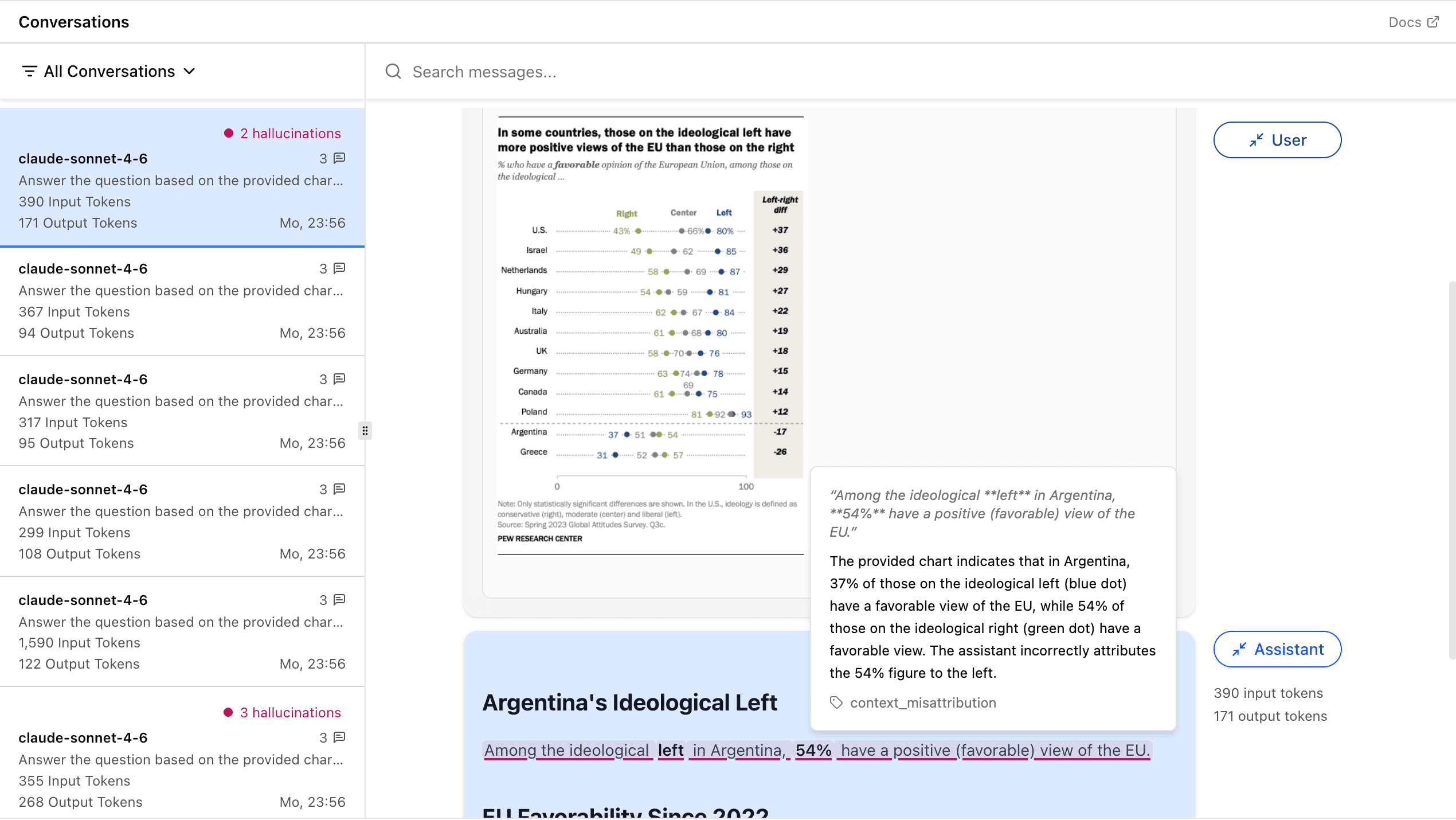
After running your code, traces appear in your workspace within a few seconds. Blue Guardrails extracts images and PDF files from the trace and evaluates the assistant's response against them for issues.
Open Conversations in the sidebar and select a conversation. Images and PDF files appear inline in user messages. Click a PDF or image preview to open a larger viewer. Issues in the assistant's response are underlined in pink, just like in text-only conversations.
For more on working with the conversations view, see Monitor your AI application for issues.