
Detect hallucinations from multimodal input
Send traces that include images in user messages and get hallucination detection on the model's responses.
This guide shows you how to send traces that contain images to Blue Guardrails. Hallucination detection works on conversations with image input the same way it works on text-only conversations. You instrument your code, send traces, and detection runs automatically.
Prerequisites
- A Blue Guardrails account with a workspace, an API key, and credits
- An application that sends images to an LLM (see Getting started for basic setup)
Send traces with image input
Your instrumentation setup stays the same as described in Getting started. The only change is in the messages you send to the model: include one or more images alongside text.
Each framework has its own format for image content. The examples below load an image from disk and send it as part of a user message.
import os
import base64
from pathlib import Path

os.environ['OTEL_EXPORTER_OTLP_TRACES_ENDPOINT'] = 'https://api.blueguardrails.com/v1/traces'
os.environ['OTEL_EXPORTER_OTLP_HEADERS'] = (
    f'x-workspace-id={YOUR_WORKSPACE_ID},'
    f'Authorization=Bearer {YOUR_API_KEY}'
)

import openai
import logfire

client = openai.Client()
logfire.configure(send_to_logfire=False)
logfire.instrument_openai()

image_b64 = base64.b64encode(Path('chart.png').read_bytes()).decode()

response = client.chat.completions.create(
    model='gpt-5-mini',
    messages=[
        {'role': 'system', 'content': 'Answer the question based on the provided chart.'},
        {
            'role': 'user',
            'content': [
                {'type': 'text', 'text': 'What does this chart show?'},
                {
                    'type': 'image_url',
                    'image_url': {'url': f'data:image/png;base64,{image_b64}'},
                },
            ],
        },
    ],
)
print(response.choices[0].message.content)
import os
import base64
from pathlib import Path
os.environ['OTEL_EXPORTER_OTLP_TRACES_ENDPOINT'] = 'https://api.blueguardrails.com/v1/traces'
os.environ['OTEL_EXPORTER_OTLP_HEADERS'] = (
f'x-workspace-id={YOUR_WORKSPACE_ID},'
f'Authorization=Bearer {YOUR_API_KEY}'
)
import anthropic
import logfire
client = anthropic.Anthropic()
logfire.configure(send_to_logfire=False)
logfire.instrument_anthropic()
image_b64 = base64.b64encode(Path('chart.png').read_bytes()).decode()
response = client.messages.create(
max_tokens=1000,
model='claude-haiku-4-5',
system='Answer the question based on the provided chart.',
messages=[
{
'role': 'user',
'content': [
{'type': 'text', 'text': 'What does this chart show?'},
{
'type': 'image',
'source': {
'type': 'base64',
'media_type': 'image/png',
'data': image_b64,
},
},
],
},
],
)
print(response.content[0].text)import os
from pathlib import Path
os.environ['OTEL_EXPORTER_OTLP_TRACES_ENDPOINT'] = 'https://api.blueguardrails.com/v1/traces'
os.environ['OTEL_EXPORTER_OTLP_HEADERS'] = (
f'x-workspace-id={YOUR_WORKSPACE_ID},'
f'Authorization=Bearer {YOUR_API_KEY}'
)
os.environ['OTEL_INSTRUMENTATION_GENAI_CAPTURE_MESSAGE_CONTENT'] = 'true'
from google.genai import Client, types
import logfire
client = Client()
logfire.configure(send_to_logfire=False)
logfire.instrument_google_genai()
image_data = Path('chart.png').read_bytes()
response = client.models.generate_content(
model='gemini-3-flash-preview',
config=types.GenerateContentConfig(
system_instruction='Answer the question based on the provided chart.',
),
contents=[
types.Part.from_bytes(data=image_data, mime_type='image/png'),
'What does this chart show?',
],
)
print(response.text)import os
from pathlib import Path
os.environ['OTEL_EXPORTER_OTLP_TRACES_ENDPOINT'] = 'https://api.blueguardrails.com/v1/traces'
os.environ['OTEL_EXPORTER_OTLP_HEADERS'] = (
f'x-workspace-id={YOUR_WORKSPACE_ID},'
f'Authorization=Bearer {YOUR_API_KEY}'
)
import logfire
from pydantic_ai import Agent
from pydantic_ai.messages import BinaryContent
logfire.configure(send_to_logfire=False)
logfire.instrument_pydantic_ai()
image_data = Path('chart.png').read_bytes()
agent = Agent(
'openai:gpt-5-mini',
output_type=str,
system_prompt='Answer the question based on the provided chart.',
)
result = agent.run_sync([
'What does this chart show?',
BinaryContent(data=image_data, media_type='image/png'),
])
print(result.output)import os
import base64
from pathlib import Path
os.environ['OTEL_EXPORTER_OTLP_TRACES_ENDPOINT'] = 'https://api.blueguardrails.com/v1/traces'
os.environ['OTEL_EXPORTER_OTLP_HEADERS'] = (
f'x-workspace-id={YOUR_WORKSPACE_ID},'
f'Authorization=Bearer {YOUR_API_KEY}'
)
os.environ['OTEL_INSTRUMENTATION_GENAI_CAPTURE_MESSAGE_CONTENT'] = 'true'
import logfire
from haystack.components.generators.chat import OpenAIChatGenerator
from haystack.dataclasses import ChatMessage
from haystack.dataclasses.image_content import ImageContent
logfire.configure(send_to_logfire=False)
logfire.instrument_openai()
image_b64 = base64.b64encode(Path('chart.png').read_bytes()).decode()
generator = OpenAIChatGenerator(model='gpt-5-mini')
response = generator.run([
ChatMessage.from_system('Answer the question based on the provided chart.'),
ChatMessage.from_user(
content_parts=[
'What does this chart show?',
ImageContent(base64_image=image_b64, mime_type='image/png'),
]
),
])
print(response)import os
import base64
from pathlib import Path
# Set these before importing langchain
os.environ['LANGSMITH_OTEL_ENABLED'] = 'true'
os.environ['LANGSMITH_OTEL_ONLY'] = 'true'
os.environ['LANGSMITH_TRACING'] = 'true'
os.environ['OTEL_EXPORTER_OTLP_TRACES_ENDPOINT'] = 'https://api.blueguardrails.com/v1/traces'
os.environ['OTEL_EXPORTER_OTLP_HEADERS'] = (
f'x-workspace-id={YOUR_WORKSPACE_ID},'
f'Authorization=Bearer {YOUR_API_KEY}'
)
import logfire
from langgraph.prebuilt import create_react_agent
logfire.configure(send_to_logfire=False)
image_b64 = base64.b64encode(Path('chart.png').read_bytes()).decode()
agent = create_react_agent('openai:gpt-5-mini', tools=[], name='agent')
result = agent.invoke({
'messages': [
{
'role': 'user',
'content': [
{'type': 'text', 'text': 'What does this chart show?'},
{
'type': 'image_url',
'image_url': {'url': f'data:image/png;base64,{image_b64}'},
},
],
}
]
})
print(result['messages'][-1].content)You can send multiple images in a single message. Add more image content blocks to the same user message.
Review detected hallucinations
After running your code, traces appear in your workspace within a few seconds. Blue Guardrails extracts the images from the trace and evaluates the assistant's response against them for hallucinations.
Open Conversations in the sidebar and select a conversation. Images appear inline in user messages. Hallucinations in the assistant's response are underlined in pink, just like in text-only conversations.
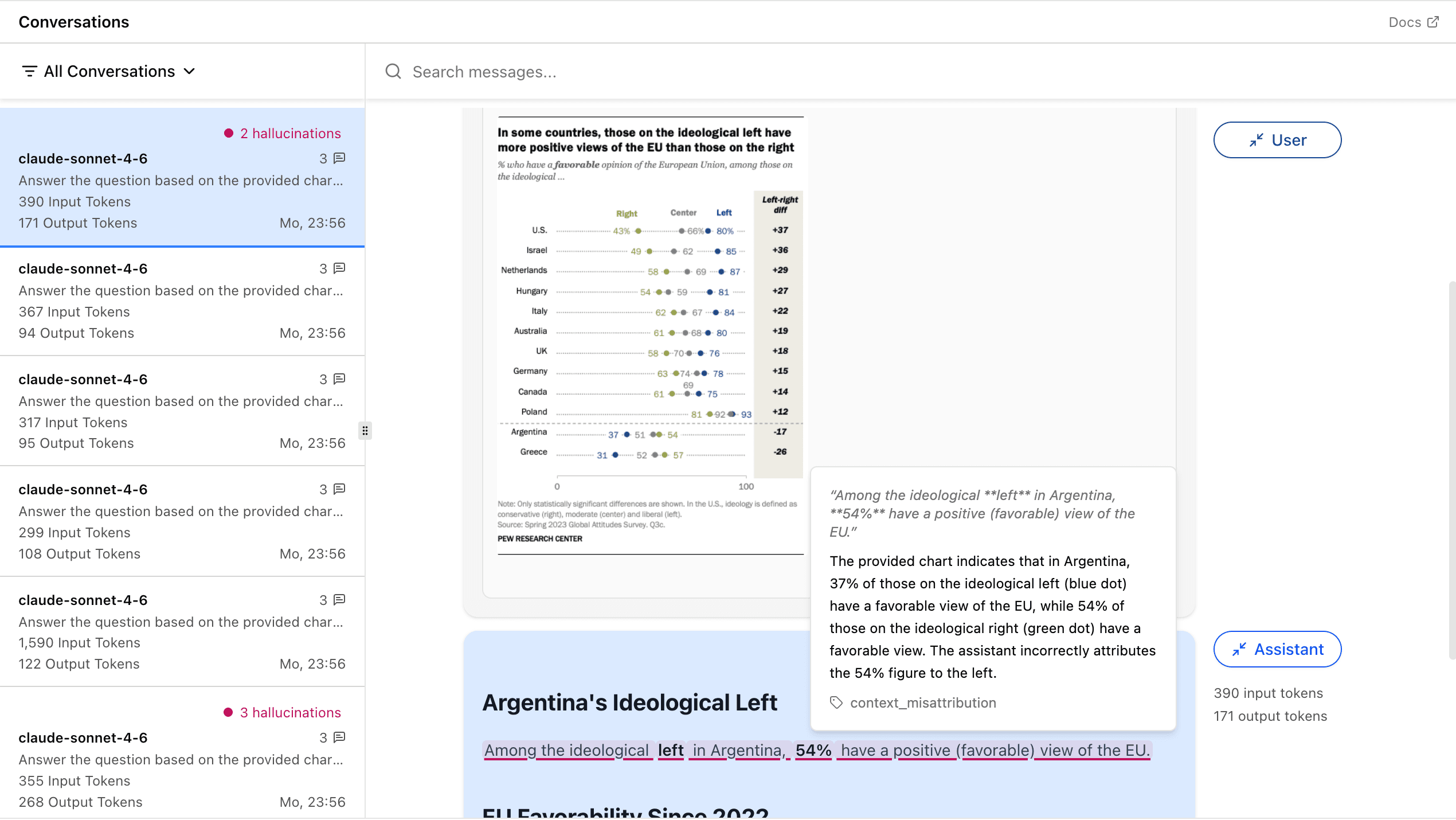
For more on working with the conversations view, see Monitor your AI application for hallucinations.
Detect hallucinations with the live detection API
Send messages directly to the API and get hallucination annotations back in real time, without sending traces first.
Use experiments to compare model hallucination rates
Run conversations through different models and compare their hallucination behavior.